
In this article:
- What is the new flow builder?
- What is Advanced Sync?
- Am I using the classic or new flow builder?
- Do I need Advanced Sync features?
- Supported connectors and resources
What is the new flow builder?
The new flow builder is our most powerful platform update to date. While the classic builder is excellent for standard work management syncs, the new builder provides direct access to all custom and native objects exposed by a tool’s API.
This means Unito can now connect relational objects like Salesforce Opportunities, Azure DevOps Iteration Paths, or Jira Assets that were previously inaccessible. The new builder can sync both simple and mixed hierarchies, allowing you to manage complex relationships—like a Portfolio containing multiple Projects—within a single, unified workflow.
What is Advanced Sync?
It is important to understand that Advanced Sync is a specific set of features available only on the new flow builder. When a connector is "Advanced Sync-enabled," it unlocks three core pillars of functionality:
- Mixed Hierarchies: The ability to sync relationships between different item types (e.g., mapping the relation between a project and tasks in Asana to an epic and stories in Jira) while keeping parent-child links perfectly intact across systems.
- Item Matching: A feature that identifies and links existing records across tools using unique IDs or custom fields. This ensures that when you launch a flow for the first time, Unito connects your existing data instead of creating duplicates.
- Historical Data Sync: Sync large data sets, including past records to ensure historical data is reflected accurately across connected platforms.
- Field Transformers: Modify and clean data during syncs, like reformatting fields or standardizing values between systems.
Am I using the classic or new flow builder?
You can identify which version of the platform you are on by looking for these cues:
- Plan and timing: Most enterprise accounts created after December 2025 default to the new flow builder.
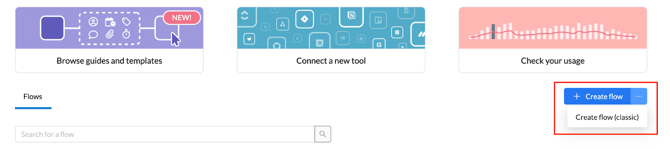
- Building a new flow:
- New flow builder: When you click to build a new flow, you will see two options: Create flow (the new builder) and Create classic flow.
- Classic builder: You will only see the option to Create classic flow.
Do I need Advanced Sync features?
Both the classic and new flow builders offer deep, two-way sync, continuous mirroring, and complex filtering rules. However, you should use the new flow builder with Advanced Sync capabilities if your workflow requires:
- High complexity: You need parent-child relationships to stay intact across different work item types, such as Epics syncing to Projects.
- Relational data: You need to sync dependencies, record owners, or other linked objects between disparate tools.
- High data volume: Your organization needs to handle massive data sets or requires historical data sync from years prior.
- Scalable governance: You want to build one "master flow" that automatically handles the creation of new projects or epics, removing the administrative burden of manual setup.
Want to learn more about Advanced Sync features?
Contact our team to discuss your use case and learn how Advanced Sync can support your workflow.
Supported connectors and resources
Certain connectors are now Advanced Sync-enabled, meaning they unlock the full suite of modern platform features for those tool pairings. Below are the resources for both our classic and new flow builders:
Advanced sync-enabled connectors
- Airtable: Advanced Integration Guide | Classic Integration Guide
- Asana: Advanced Integration Guide | Classic Integration Guide
- Azure DevOps: Advanced Integration Guide | Classic Integration Guide
- Jira Cloud: Advanced Integration Guide | Classic Integration Guide
- Jira Service Management: Advanced Integration Guide | Classic Integration Guide
- Salesforce: Advanced Integration Guide | Classic Integration Guide
- ServiceNow: Advanced Integration Guide | Classic Integration Guide
Advanced sync feature guides
- Lookups: How to Use Lookups
- Item Matching: A Guide to Item Matching
- Mixed Hierarchies: A Guide to Syncing Mixed Hierarchies
Coming soon
- NetSuite
Enterprise-grade sync, simplified
Building flows on the modern platform may look different than the classic experience, but the result is the same: enterprise-grade sync without the enterprise-grade complexity. By abstracting complex technical configuration, Unito ensures that non-technical team members can build and maintain powerful, flexible workflows. This keeps your total cost of ownership low while providing scalable, two-way sync.