
In this article:
- Where to find your Change History
- What each entry shows
- What the log records
- How to use your Change History to troubleshoot
- Related articles
This is an advanced feature available to Enterprise accounts created after December 2025. Contact our team to learn more.
Where to find your Change History
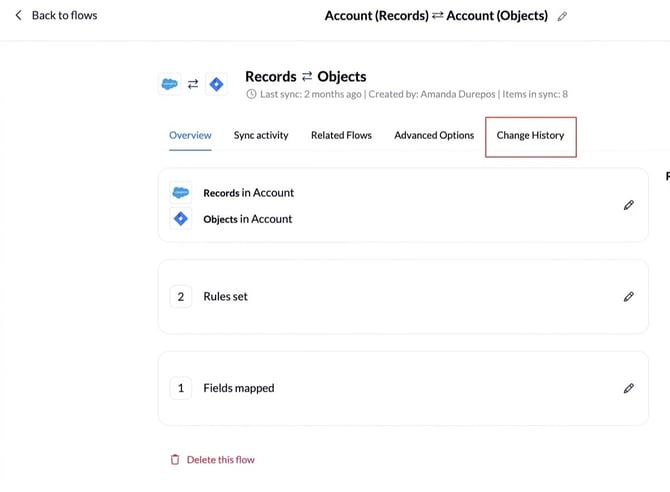
Open your flow and select the Change History view on its overview page.
What each entry shows
Each entry is one saved change, newest first.
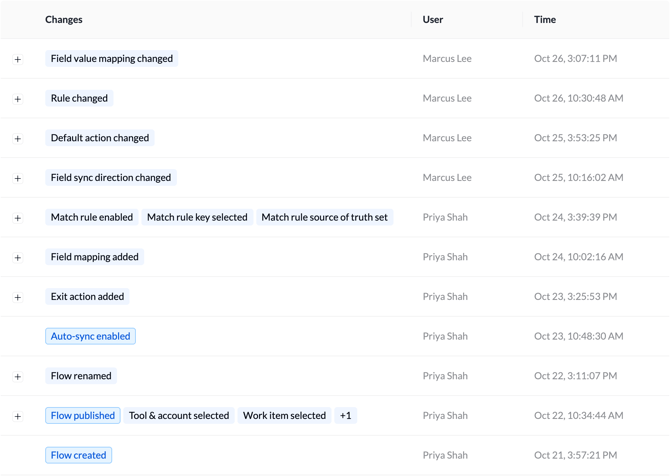
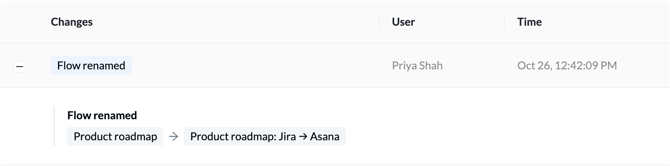
It shows who made the change, when, what changed and the value before and after.
The author appears as the person's name when someone on your team made the change. It appears as "Unito" for an automatic change, such as Unito pausing a flow that kept failing.
What the log records
Your Change History shows edits to these parts of a flow:
- Flow name and status. Its name, and when it is published, paused or deleted.
- Filters and rules. Which items sync.
- Field mapping. Which field in one tool pairs with which field in the other.
- Default values. What Unito fills in when a field has nothing to copy.
- Exit values. The value Unito sets on an item when it no longer meets the flow’s rules.
- Item matching. How Unito finds existing work items in the other tool instead of creating duplicates.
- Which tool wins. The truth side, which decides whose value Unito keeps when the same field changes in both tools.
- Advanced options (field transformers). How fields are combined or reformatted, such as joining two fields into one.
- Auto-sync. Turning it on or off. With it off, items sync only when someone clicks “Sync now.”
How to use your Change History to troubleshoot
- Find. Open Change History and scroll to the date the behavior changed.
- Analyze. Read the entries around that date: a rule, a mapping or a default value.
- Fix. In the flow, change the setting back to what it was. Or ask the person who made the change.
Related articles
- Understanding Flow Statuses: see at a glance whether a flow is working.
- Follow an item's sync history with Sync Activity: see what happened to each item and why.