
In this article:
What is a hierarchical flow?
A hierarchical flow preserves the hierarchy in the tools you sync with Unito. Parent-child relationships (e.g., tasks and subtasks) are preserved across your flow, meaning you'll find the same hierarchy in both tools you sync with Unito.
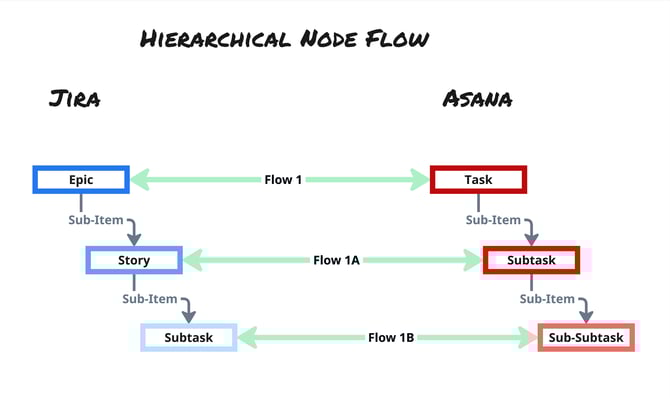
For example, a hierarchical flow syncing Jira with Asana can turn an Epic/Issue relationship in Jira into a Task/Subtask relationship in Asana. Or in the case of Smartsheet and Azure DevOps, a hierarchical flow can map Parent and Child Rows in Smartsheet to Epics and User Stories or Tasks in Azure DevOps, preserving those relationships and any updates across both tools.
Any updates across these relationships are preserved in both tools, maintaining context for all teams.
Looking to sync levels of hierarchies of different types? Check out this article.
When to pick a hierarchical flow
-
Your workflow depends on the relationships in your tools.
- You need to visualize hierarchies across tools.
Other considerations
- With a hierarchy node, the sync works from the top down. By default, only the work items at the highest level of the selected hierarchy are synced.
- If you choose to include sub-items or sub-tasks, Unito will sync the full hierarchy beneath those items. It is not possible to sync a child item if its parent is not in sync. Filters also apply from the top down, meaning a child will not sync unless its parent matches the flow’s rules.
- With a hierarchy node, you cannot skip levels. For example, if you are syncing a Jira hierarchy of Initiatives → Epics → Stories, you cannot sync Initiatives -> Stories. Epics must also be included in order to sync stories.
- Jira Cloud has a third option, strict hierarchy, that lets you start at a specific level. See "Which Jira Cloud Work Items Node Should I Choose?"
What is a flat flow?
A flat flow allows you to sync whichever item in your container you would like, regardless of hierarchy, but does not preserve the hierarchy. Parent-child relationships (e.g., epics and stories) are not translated between your tools. You can still sync the work items in these relationships as individual work items (e.g., sync both Jira Epics and Stories), but the relationship between them is not maintained by default. In some cases, users can recreate a parent-child link by mapping the parent field between tools, though this depends on the specific tools involved and comes with limitations.
When to pick a flat flow
-
You need to visualize work items in a list.
-
You're reporting on or tracking work without defined hierarchies.
-
Maintaining hierarchy isn't as important in the destination tool as in the source tool.
-
You need to sync work items based on specific rules (such as only Jira Bugs, only tasks with a specific label, or only Stories assigned to a specific team), regardless of where they sit in the source tool hierarchy
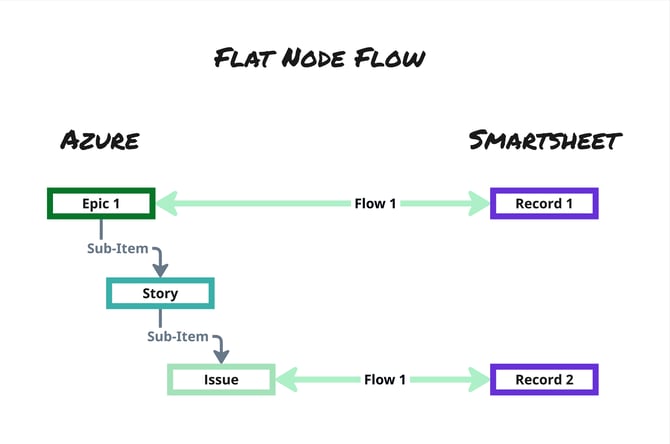
Other things to keep in mind
- Each Unito flow can only be one type of flow (i.e., hierarchical or flat). You can't have a flow that is hierarchical for one tool and flat for the other.
-
Not every tool offers both options. When a tool does, you’ll see them in the item picker.